
Case study
University Library RFID Self-Checkout & Koha
Case study: How a 180,000-volume university central library automated book circulation, integrated Koha ILS via SIP2, and cut student checkout queues by 80%.

Simulate, evaluate, or request turnkey hardware & middleware deployment
-
80% Slashed
Circulation Desk Queues
from 15 mins to < 20 secs
-
5 Books / 3s
Stack Checkout Speed
simultaneous multi-book read
-
100% Real-Time
Koha Sync Accuracy
SIP2 protocol automation
Operational Transformation: Manual Barcode Staging vs. Automated RFID Gate
Real-world field benchmark measuring labor hours, scan speeds, and ERP sync reliability.
Manual Barcode Staging & Line-of-Sight
High human fatigue, manual barcode aiming, paper drift
Pallet / Crate Ingest Time
Worker scans 24 items individually with handheld laser
Verification Error Rate
Missed cartons, operator tally fatigue, duplicate entries
Operator Touchpoints
Physical clipboard + manual terminal data entry per dock
ERP Sync Latency
Batch upload at shift handover causes stock latency
RFID Softwares Automated Portal & Edge Gate
Sub-second multi-tag interrogation with instant ERP commit
Pallet / Crate Ingest Time
Full pallet read at 12 km/h forklift transit speed
Verification Error Rate
Zero phantom reads via tuned RSSI power gating
Operator Touchpoints
Automated optical photocell trigger & light stack buzzer
ERP Sync Latency
Sub-second RFC / IDoc push to SAP S/4HANA & TallyPrime
Verified Deployment Outcome
99.3% Labor Time Cut • 100% Audit-Proof Physical-to-Digital ERP Traceability
University Library: Touch Kiosk & Koha SIP2 Video Demo
Watch students checkout multiple books simultaneously on self-issue kiosks integrated with Koha ILS.
Smart Library RFID Management System & Self-Issue Kiosk
ISO 15693 / ISO 28560 automated book check-in and inventory audit wand
Project Overview: University Library Peak-Hour Circulation Bottlenecks
A central university library serving over 15,000 undergraduate, postgraduate, and faculty researchers houses an extensive collection of 180,000+ academic textbooks, bound journals, and rare reference volumes. During midterm exams, end-semester submissions, and academic admission cycles, the library’s central circulation desk experienced severe congestion.
The Circulation Crisis:
- Long Waiting Queues: Students waited up to 20 minutes in line for manual optical barcode scanning and manual stamping of return due-date slips.
- Labor-Intensive Counter Transactions: Library staff were tied up with routine book issues and returns, leaving no time for reference desk assistance or digital catalog maintenance.
- Koha Data Discrepancies: Manual accession barcode entry led to typographical errors, misfiled returns, and inaccurate overdue fine calculations in the Koha open-source database.
Software Integration: Standard Interchange Protocol (SIP2) & Koha ILS
To enable seamless communication between self-service hardware and the university’s Koha Integrated Library System (ILS), RFID Softwares deployed an enterprise-grade SIP2 / NCIP middleware gateway:
- Bidirectional SIP2 Protocol Handshake: Our RFID Library Management Koha Integration Software connects to Koha over secure TCP/IP sockets using the standard 3M SIP2 protocol.
- Real-Time Patron Validation: When a student authenticates at the kiosk, the middleware sends a Patron Information Request (63/64) to Koha, instantly validating student registration status, active loan counts, and outstanding fine balances in under 150 milliseconds.
- Automated Item Check-In/Check-Out (11/12): Books placed on the kiosk bed trigger immediate item status updates in Koha, updating the loan ledger and sending digital receipts to the student’s registered email.
Kiosk Hardware: Multi-Book RFID Bed & Contactless Student ID Authentication
Circulation counters were replaced with modern, ergonomic RFID Self-Checkout Kiosks featuring high-contrast touchscreens and shielded HF read beds:
- Simultaneous Multi-Book Stack Scanning: Each book is tagged inside the back cover with a long-life HF Library Inlay Tag (ISO 15693). The kiosk’s shielded RF bed reads a stack of 4 to 6 books placed together in just 3 seconds, eliminating one-by-one barcode handling.
- Smart EAS Security Bit Deactivation: As Koha approves the loan transaction, the kiosk automatically switches the tag’s internal Electronic Article Surveillance (EAS) security bit from Active to Inactive, allowing the student to walk through exit security gates without triggering alarms.
- Contactless Student Card Tap: Students authenticate instantly by tapping their existing university Mifare/NFC ID card on the kiosk reader panel.
24/7 Smart Book Return Chute & Staff Tagging Workstations
To provide round-the-clock return convenience and streamline catalog tagging for newly acquired books, the solution included:
- 24/7 Outdoor Smart Book Drop: An exterior weatherized book return chute allows students to return books after library hours. As a book slides through the chute, internal HF sensors identify the tag, immediately check the item in on Koha, reactivate the EAS security bit, and print an automated timestamped receipt.
- Staff Tagging Workstation: Behind the scenes, library catalogers use the HF Desktop RFID Reader & Writer to rapidly commission new books, linking the RFID chip UID with the Koha MARC-21 accession record in one click.
Operational Results & Academic Library ROI
The deployment of Koha-integrated RFID self-service technology delivered dramatic operational and student experience improvements:
- 80% Reduction in Circulation Desk Queues: Over 85% of all daily book issues and returns are now handled independently by students via self-service kiosks in under 20 seconds.
- Zero Catalog Discrepancies: Automated Koha SIP2 synchronization eliminated manual entry mistakes, lost loan records, and fine disputes.
- Extended 24/7 Return Availability: Students can return academic materials at any hour without library staff presence.
- Full Investment Payback in 4.2 Months: Reduced administrative staff workload and elimination of unreturned book loss fully amortized project costs within one academic semester.
Interactive RFID Engineering Tools & Calculators
Use our free interactive calculators and simulators to model RF physics, calculate link budgets, estimate ROI, and configure EPC tags.
RFID ROI & Payback Calculator
Calculate 12-month return on investment, shrinkage reduction, and labor hours saved for your facility.
RFID Project Cost Estimator
Estimate turnkey budget breakdown including readers, antennas, tags, cloud software, and on-site engineering.
Site Survey Checklist Generator
Generate a customized engineering checklist covering RF noise floors, power drops, and portal mounting requirements.
Automating Library Book Circulation & Drop-Box Returns?
Seamlessly integrate ISO 28560 RFID tags with Koha ILS or your existing library management database for high-speed batch checkouts.
Deployed hardware & software
Products Used in This Case Study
Discover the professional-grade RFID readers, tags, and custom integration software systems implemented in this deployment.
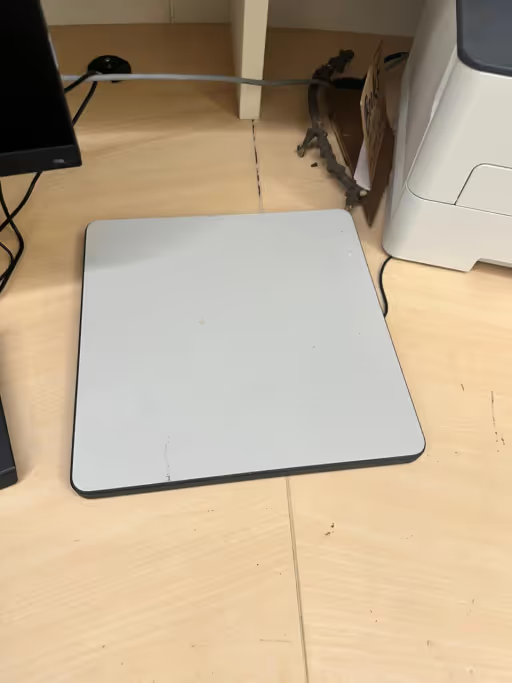
HF Desktop RFID Reader & Writer and USB Smart Card Scanner
Plug-and-play USB desktop RFID programmer for fast book cataloging, tagging, and staff circulation processing.
Frequently asked questions
How does the RFID self-checkout kiosk communicate with our Koha library server?
Can students check out a stack of multiple books at once on the kiosk bed?
How does the system prevent books from triggering the exit security alarm?
What happens if the university network or internet goes offline temporarily?
Discover more
You may also like
Hand-picked articles and pages worth your time next.

RFID Self-Checkout Kiosk (Library & Retail)
Touchscreen self-service kiosk with shielded multi-book RFID bed, patron card scanner, and integrated thermal receipt printer.

RFID Library Management System with Koha Integration
Standard SIP2/NCIP middleware connecting RFID self-checkout kiosks, book drops, and security gates with Koha open-source ILS.

HF Library Inlay Tags (ISO 15693)
Long-life 13.56 MHz archival RFID book stickers with integrated EAS security bit for academic library collections.
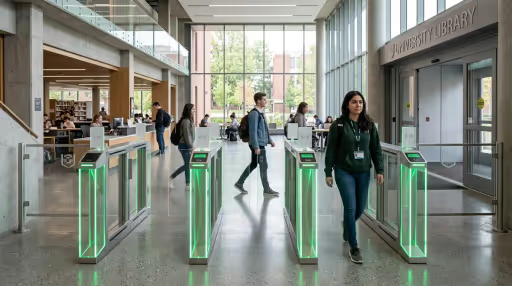
RFID Library Management System: Self-Checkout Kiosks & Koha Sync
Comprehensive RFID library management system engineering for Indian universities. 3D anti-theft EAS security gates, ISO 28560 HF/UHF tag models & ILS integration.

RFID for Libraries India | Patron Self-Checkout & NAAC Audit
Automate university and public libraries in India with RFID self-checkout kiosks. Audit 1,00,000+ volumes in 4 hours, reduce book loss & achieve NAAC digital compliance.
HF Desktop RFID Reader & Writer and USB Smart Card Scanner
Program tags quickly with HF desktop RFID reader writer. USB RFID desktop reader supports ISO 15693/14443A protocols. Order online today.