
Real-Time RFID Tally Integration for Automated Inventory
Connect fixed RFID reader portals and rugged Android handhelds directly to TallyPrime via TCP Port 9000. Instantly generate Stock Journal vouchers, automate purchase receives, and verify physical warehouse godowns with 0% manual keystrokes.
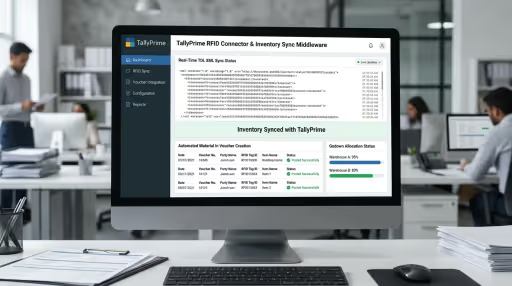
Turnkey RFID Integration for TallyPrime 1.0–5.0+ & Tally.ERP 9
Don’t have internal developers or want to avoid coding risks? We deliver complete end-to-end implementation across India—from hardware mounting and RF site calibration to custom ERP sync and on-site warehouse operator training.
Rapid 2–3 Week Go-Live
Skip months of internal R&D, trial-and-error socket programming, and protocol debugging. Our pre-engineered middleware connects to TallyPrime on Day 1.
Single-Vendor Accountability
No finger-pointing between hardware suppliers and software contractors. We supply, configure, mount, integrate, and warrant the entire ecosystem under one SLA.
Zero Ongoing Seat Royalties
Unlike proprietary SaaS platforms charging recurring per-user or per-reader licenses, our turnkey solutions grant your enterprise 100% perpetual software ownership.
Everything Included in Your Deployment
Our comprehensive turnkey integration contract covers every layer of the physical-to-digital bridge:
Pre-Configured RFID Handhelds & Scanners
Rugged Android terminals (Chainway C72 / Zebra MC3300R) shipped pre-configured with OpenRFID client connected to your Tally instance.
Zero-Plugin HTTP Voucher Engine
Autonomous edge service that converts burst EPC scans into validated TDL <ENVELOPE> Stock Journals and Physical Stock vouchers.
Godown & Batch Allocation Mapping
Seamless alignment of physical tags to Tally Godowns, Batches, Manufacturing Dates, and Expiry Dates with zero intermediate files.
Custom EPC & Antenna User-Defined Fields (UDFs)
Custom compiled TDL extensions storing exact Tag EPC, Antenna RSSI, and Operator Employee ID directly on the Tally voucher record.
On-Site Warehouse Operator Onboarding
Hands-on training for floor staff, bilingual cheat sheets, and godown audit standard operating procedures (SOPs).
12-Month Production Warranty & Support
Full hardware breakdown coverage, Tally version upgrade compatibility (e.g. TallyPrime 4 to 5), and priority remote support.
4-Week Production Deployment Roadmap
Predictable timelines with zero disruption to active warehouse or factory operations:
Tally Company & Godown Audit
Our engineers analyze your Tally company configuration, stock item master list, godown hierarchy, and barcode-to-EPC mapping scheme.
Hardware & Gateway Calibration
We bench-test physical readers with sample tagged stock, configure Port 9000 XML endpoints, and verify debounce filtering.
Live Godown Pilot Run
Deployment of 1–2 handhelds at your primary warehouse to perform parallel physical audits alongside existing manual processes.
Cutover & Operator Training
Production cutover, live voucher posting into Tally, floor staff training, and handover of administrator documentation.
Select Your Turnkey Deployment Package
Transparent scopes tailored to your operational scale, whether pilot testing or national rollout:
Godown Stock Audit Pilot
Ideal for validating RFID stocktaking in a single godown
- 1x Rugged Android RFID Scanner (Chainway C72 / C66)
- Pre-installed OpenRFID Tally client
- Port 9000 XML gateway service setup
- Up to 1,000 pre-printed sample UHF tags
- Physical Stock voucher auto-creation
- Remote deployment & 3 months SLA
Multi-Godown Enterprise Turnkey
Complete automation across manufacturing floors and central godowns
- 3x–5x Rugged Android Mobile Handhelds
- 1x High-speed RFID Desktop Printer / Encoder
- Stock Journal inter-godown transfer automation
- Custom TDL UDF fields for EPC & operator tracking
- On-site deployment & operator training (Pan-India)
- 12 Months comprehensive SLA & AMC coverage
Turnkey Dock Door Portal
Hands-free automated dispatch & receiving gate integration
- 1x 4-Port Fixed Reader + 4x Circular Antennas
- Industrial mounting portal frame & 24V stack lights
- Directional inbound vs outbound detection engine
- Instant automated Purchase Receive vouchers in Tally
- Audio buzzer alarm on unauthorized stock movements
- 12 Months on-site engineering SLA warranty
Certified Reader Hardware
Already procured scanners or procuring fresh? Our turnkey middleware is thoroughly bench-tested and certified across leading global RFID hardware vendors.
100% Perpetual Code Ownership
Zero per-seat recurring fees or vendor lock-in. Your team gets complete source code ownership.
Sub-Second Real-Time Sync
Debounced buffer architecture guarantees ERP commit in under 1 second without database crashes.
Offline Resilience Guarantee
Local SQLite Write-Ahead Logging retains 1M+ scans with zero data loss during Wi-Fi blackouts.
12-Month Hardware & AMC Support
Comprehensive warranty covering reader tuning, firmware updates, and operational SLA support.
Need a customized integration scope or site survey?
Our senior RFID solution architects can evaluate your facility layout, ERP version, and throughput requirements over a 30-minute discovery call.
How to Enable TallyPrime HTTP Server on Port 9000
Before physical RFID readers or edge gateways can post inventory vouchers, TallyPrime must be configured to accept incoming HTTP requests on port 9000:
Open Connectivity Settings
In TallyPrime, press F1 (Help) → Select Settings → Select Connectivity.
Configure Server Port
Under Client/Server configuration, set TallyPrime acts as to Both or Server, Enable ODBC to Yes, and Port to 9000.
Windows Firewall Rule
Open Windows Defender Firewall → Inbound Rules → New Rule → Port → TCP 9000 → Allow connection. This permits warehouse handhelds on Wi-Fi to reach the Tally server.
Physical Stock vs. Stock Journal: Choosing the Right Voucher Type
Depending on your inventory workflow, OpenRFID compiles scanned EPC batches into either Physical Stock vouchers or Stock Journal envelopes:
Physical Stock Voucher
Used when warehouse operators walk aisles with handheld scanners (Chainway C72 or Zebra MC3300R). It records the actual physical count found in each Godown and automatically reconciles book balance without affecting financial P&L accounts.
- Replaces manual counting on clipboards with 700+ tags/sec sweeps.
- Only specifies audited Godown, SKU name, Batch, and Actual Physical Qty.
- Generates instant variance reports in Tally: Display → Statements of Inventory → Stock Summary.
Stock Journal Voucher
Used for inter-godown transfers (e.g. moving goods from Central Warehouse to Retail Showroom) or consumption in manufacturing (Raw Materials issued to Work in Progress).
- Supports dual line entries: Source (Consumption) and Destination (Production/Arrival).
- Automates dock portal transit transfers when forklifts pass between warehouse bays.
- Maintains FIFO cost attribution and GST state-to-state inventory trail.
Automated Stock Journal Voucher XML Payload
This standard TDL XML payload is dynamically compiled by our RFID gateway and posted via HTTP to http://localhost:9000/:
<ENVELOPE>
  <HEADER>
    <VERSION>1</VERSION>
    <TALLYREQUEST>Import</TALLYREQUEST>
    <TYPE>Data</TYPE>
    <ID>Vouchers</ID>
  </HEADER>
  <BODY>
    <DESC>
      <STATICVARIABLES>
        <SVVCHIMPORTFORMAT>XML</SVVCHIMPORTFORMAT>
        <SVCURRENTCOMPANY>Enterprise Garments Ltd</SVCURRENTCOMPANY>
      </STATICVARIABLES>
      <TALLYMESSAGE xmlns:UDF="TallyUDF">
        <VOUCHER VCHTYPE="Stock Journal" ACTION="Create" OBJVIEW="Inventory Voucher View">
          <DATE>20260912</DATE>
          <VOUCHERTYPENAME>Stock Journal</VOUCHERTYPENAME>
          <VOUCHERNUMBER>RFID-AUDIT-901</VOUCHERNUMBER>
          <NARRATION>Automated RFID audit sweep via Chainway C72</NARRATION>

          <!-- Source (Consumption) Godown -->
          <INVENTORYENTRIESIN.LIST>
            <STOCKITEMNAME>Cotton Denim Jeans 32</STOCKITEMNAME>
            <ISDEEMEDPOSITIVE>No</ISDEEMEDPOSITIVE>
            <RATE>1200.00</RATE>
            <AMOUNT>-12000.00</AMOUNT>
            <ACTUALQTY>-10 Pcs</ACTUALQTY>
            <BILLEDQTY>-10 Pcs</BILLEDQTY>
            <BATCHALLOCATIONS.LIST>
              <GODOWNNAME>Central Warehouse</GODOWNNAME>
              <BATCHNAME>LOT-2026-B</BATCHNAME>
              <AMOUNT>-12000.00</AMOUNT>
              <ACTUALQTY>-10 Pcs</ACTUALQTY>
              <BILLEDQTY>-10 Pcs</BILLEDQTY>
            </BATCHALLOCATIONS.LIST>
          </INVENTORYENTRIESIN.LIST>

          <!-- Destination (Audited) Godown -->
          <INVENTORYENTRIESOUT.LIST>
            <STOCKITEMNAME>Cotton Denim Jeans 32</STOCKITEMNAME>
            <ISDEEMEDPOSITIVE>Yes</ISDEEMEDPOSITIVE>
            <RATE>1200.00</RATE>
            <AMOUNT>12000.00</AMOUNT>
            <ACTUALQTY>10 Pcs</ACTUALQTY>
            <BILLEDQTY>10 Pcs</BILLEDQTY>
            <BATCHALLOCATIONS.LIST>
              <GODOWNNAME>Audited Retail Floor</GODOWNNAME>
              <BATCHNAME>LOT-2026-B</BATCHNAME>
              <AMOUNT>12000.00</AMOUNT>
              <ACTUALQTY>10 Pcs</ACTUALQTY>
              <BILLEDQTY>10 Pcs</BILLEDQTY>
            </BATCHALLOCATIONS.LIST>
          </INVENTORYENTRIESOUT.LIST>
        </VOUCHER>
      </TALLYMESSAGE>
    </DESC>
  </BODY>
</ENVELOPE>
Why Use Native XML Over ODBC?
While Tally provides read-only ODBC access, ODBC cannot write multi-line inventory transactions with batch and godown allocations. The native XML HTTP server on Port 9000 is the official, high-integrity write protocol for TallyPrime.
Edge Debouncing & Deduplication
When a worker walks past a pallet, RFID tags respond hundreds of times per second. Our edge gateway buffers scans in a 3-second sliding window, deduplicates by EPC, resolves the SKU in local cache, and sends only aggregated line totals to TallyPrime.
Upon receiving the payload, Tally returns HTTP 200 with <CREATED>1</CREATED>. If an item does not exist or a date is locked, Tally returns <ERRORS>1</ERRORS> with <LINEERROR>, which our gateway automatically logs to prevent inventory mismatches.
Python 3 & C# .NET 8 TallyPrime HTTP Client Implementation
Production-grade scripts with connection health check, error XML parsing, and automated voucher creation:
import requests
import xml.etree.ElementTree as ET
from typing import List, Dict, Tuple

class TallyRfidGateway:
    def __init__(self, host: str = "http://localhost", port: int = 9000, timeout: int = 10):
        self.endpoint = f"{host}:{port}/"
        self.timeout = timeout
        self.headers = {'Content-Type': 'text/xml; charset=utf-8'}

    def verify_connection(self) -> bool:
        """Ping TallyPrime HTTP Port 9000."""
        try:
            r = requests.get(self.endpoint, timeout=3)
            return r.status_code == 200
        except requests.exceptions.RequestException:
            return False

    def post_stock_journal(self, date_str: str, vch_no: str, item_name: str,
                           src_godown: str, dest_godown: str, qty: int, rate: float = 0.0) -> Tuple[bool, str]:
        """
        Posts automated Stock Journal moving items from source godown to audited destination godown.
        Returns: (success: bool, response_message: str)
        """
        payload = f"""<ENVELOPE>
  <HEADER><VERSION>1</VERSION><TALLYREQUEST>Import</TALLYREQUEST><TYPE>Data</TYPE><ID>Vouchers</ID></HEADER>
  <BODY>
    <DESC><STATICVARIABLES><SVVCHIMPORTFORMAT>XML</SVVCHIMPORTFORMAT></STATICVARIABLES>
      <TALLYMESSAGE xmlns:UDF="TallyUDF">
        <VOUCHER VCHTYPE="Stock Journal" ACTION="Create">
          <DATE>{date_str}</DATE>
          <VOUCHERTYPENAME>Stock Journal</VOUCHERTYPENAME>
          <VOUCHERNUMBER>{vch_no}</VOUCHERNUMBER>
          <INVENTORYENTRIESIN.LIST>
            <STOCKITEMNAME>{item_name}</STOCKITEMNAME><ISDEEMEDPOSITIVE>No</ISDEEMEDPOSITIVE>
            <RATE>{rate}</RATE><AMOUNT>-{qty * rate}</AMOUNT><ACTUALQTY>-{qty} Pcs</ACTUALQTY><BILLEDQTY>-{qty} Pcs</BILLEDQTY>
            <BATCHALLOCATIONS.LIST><GODOWNNAME>{src_godown}</GODOWNNAME><ACTUALQTY>-{qty} Pcs</ACTUALQTY></BATCHALLOCATIONS.LIST>
          </INVENTORYENTRIESIN.LIST>
          <INVENTORYENTRIESOUT.LIST>
            <STOCKITEMNAME>{item_name}</STOCKITEMNAME><ISDEEMEDPOSITIVE>Yes</ISDEEMEDPOSITIVE>
            <RATE>{rate}</RATE><AMOUNT>{qty * rate}</AMOUNT><ACTUALQTY>{qty} Pcs</ACTUALQTY><BILLEDQTY>{qty} Pcs</BILLEDQTY>
            <BATCHALLOCATIONS.LIST><GODOWNNAME>{dest_godown}</GODOWNNAME><ACTUALQTY>{qty} Pcs</ACTUALQTY></BATCHALLOCATIONS.LIST>
          </INVENTORYENTRIESOUT.LIST>
        </VOUCHER>
      </TALLYMESSAGE>
    </DESC>
  </BODY>
</ENVELOPE>"""
        try:
            resp = requests.post(self.endpoint, data=payload.encode('utf-8'), headers=self.headers, timeout=self.timeout)
            root = ET.fromstring(resp.content)
            created = int(root.findtext('.//CREATED') or 0)
            errors = int(root.findtext('.//ERRORS') or 0)
            if created > 0 and errors == 0:
                return True, f"Voucher {vch_no} created successfully."
            error_text = root.findtext('.//LINEERROR') or "Unknown TDL Error"
            return False, f"Tally Error: {error_text}"
        except Exception as ex:
            return False, f"Connection Failed: {str(ex)}"
using System.Text;
using System.Xml.Linq;

namespace OpenRFID.TallyConnector;

public class TallyRfidService
{
    private readonly HttpClient _httpClient;
    private const string TallyUrl = "http://localhost:9000/";

    public TallyRfidService(HttpClient httpClient)
    {
        _httpClient = httpClient;
    }

    public async Task<(bool Success, string Message)> CommitPhysicalStockAsync(string sku, string godown, int count)
    {
        var dateNow = DateTime.Now.ToString("yyyyMMdd");
        var xmlPayload = $@"<ENVELOPE>
  <HEADER><VERSION>1</VERSION><TALLYREQUEST>Import</TALLYREQUEST><TYPE>Data</TYPE><ID>Vouchers</ID></HEADER>
  <BODY><DESC><STATICVARIABLES><SVVCHIMPORTFORMAT>XML</SVVCHIMPORTFORMAT></STATICVARIABLES>
    <TALLYMESSAGE xmlns:UDF=""TallyUDF"">
      <VOUCHER VCHTYPE=""Physical Stock"" ACTION=""Create"">
        <DATE>{dateNow}</DATE>
        <VOUCHERTYPENAME>Physical Stock</VOUCHERTYPENAME>
        <ALLINVENTORYENTRIES.LIST>
          <STOCKITEMNAME>{sku}</STOCKITEMNAME>
          <ISDEEMEDPOSITIVE>No</ISDEEMEDPOSITIVE>
          <ACTUALQTY>{count} Pcs</ACTUALQTY>
          <BILLEDQTY>{count} Pcs</BILLEDQTY>
          <BATCHALLOCATIONS.LIST><GODOWNNAME>{godown}</GODOWNNAME><ACTUALQTY>{count} Pcs</ACTUALQTY></BATCHALLOCATIONS.LIST>
        </ALLINVENTORYENTRIES.LIST>
      </VOUCHER>
    </TALLYMESSAGE>
  </DESC></BODY></ENVELOPE>";

        using var content = new StringContent(xmlPayload, Encoding.UTF8, "text/xml");
        var response = await _httpClient.PostAsync(TallyUrl, content);
        var xmlResp = await response.Content.ReadAsStringAsync();

        var doc = XDocument.Parse(xmlResp);
        var created = (int?)doc.Descendants("CREATED").FirstOrDefault() ?? 0;
        var errors = (int?)doc.Descendants("ERRORS").FirstOrDefault() ?? 0;

        if (created > 0 && errors == 0) return (true, "Voucher created successfully in TallyPrime");

        var errorMsg = doc.Descendants("LINEERROR").FirstOrDefault()?.Value ?? "Unknown Tally XML Error";
        return (false, errorMsg);
    }
}
Test Your Local Tally Server Directly From This Browser
Download our lightweight bridge agent (TallyBridgeAgent.exe) to run live queries, verify TCP Port 9000 XML connectivity, and test automated voucher imports directly into your running TallyPrime or Tally.ERP 9.
TallyPrime Live Diagnostics & Voucher Console
Safely test read-only queries to verify your connection, or test automated RFID voucher write imports.
These tests only read metadata from your loaded Tally session. They never insert, modify, or erase any transactions or master data.
- Open TallyPrime →
F1: Help → Settings → Connectivity→ set to Both/Server on Port 9000. - Download & run
TallyBridgeAgent.exe— keep it running in the background. - Click "🏢 Company Info" in Safe Read Tests to verify your connection!
Enterprise RFID ERP & WMS Integrations
Select an enterprise platform to view verified architectural dataflows, schemas, and gateway code.
TallyPrime & ERP 9TDL XML / Port 9000
Automated Stock Journal & Physical Stock voucher creation without manual data entry.
Integration Pipeline & Flow Architecture
Integration Specifications & Protocol Parameters
import requests
import xml.etree.ElementTree as ET

TALLY_URL = "http://localhost:9000"

def post_stock_journal_to_tally(voucher_date: str, item_name: str, godown: str, qty: int, epc_list: list):
    """
    Constructs an idempotent TDL XML Stock Journal voucher and posts to Tally Port 9000.
    """
    xml_payload = f"""<ENVELOPE>
  <HEADER>
    <TALLYREQUEST>Import Data</TALLYREQUEST>
  </HEADER>
  <BODY>
    <IMPORTDATA>
      <REQUESTDESC>
        <REPORTNAME>Vouchers</REPORTNAME>
      </REQUESTDESC>
      <REQUESTDATA>
        <TALLYMESSAGE xmlns:UDF="TallyUDF">
          <VOUCHER VCHTYPE="Stock Journal" ACTION="Create">
            <DATE>{voucher_date}</DATE>
            <VOUCHERTYPENAME>Stock Journal</VOUCHERTYPENAME>
            <ALLINVENTORYENTRIES.LIST>
              <STOCKITEMNAME>{item_name}</STOCKITEMNAME>
              <ISDEEMEDPOSITIVE>Yes</ISDEEMEDPOSITIVE>
              <RATE>0</RATE>
              <AMOUNT>0</AMOUNT>
              <ACTUALQTY> {qty} Nos</ACTUALQTY>
              <BILLEDQTY> {qty} Nos</BILLEDQTY>
              <BATCHALLOCATIONS.LIST>
                <GODOWNNAME>{godown}</GODOWNNAME>
                <BATCHNAME>PRIMARY</BATCHNAME>
                <ACTUALQTY> {qty} Nos</ACTUALQTY>
                <BILLEDQTY> {qty} Nos</BILLEDQTY>
              </BATCHALLOCATIONS.LIST>
            </ALLINVENTORYENTRIES.LIST>
          </VOUCHER>
        </TALLYMESSAGE>
      </REQUESTDATA>
    </IMPORTDATA>
  </BODY>
</ENVELOPE>"""

    headers = {'Content-Type': 'application/xml; charset=utf-8'}
    response = requests.post(TALLY_URL, data=xml_payload.encode('utf-8'), headers=headers, timeout=10)

    root = ET.fromstring(response.content)
    created = root.findtext('.//CREATED')
    errors = root.findtext('.//ERRORS')
return {"created": int(created or 0), "errors": int(errors or 0)}Need a Production-Ready TallyPrime & ERP 9 Connector?
Our engineering team deploys guaranteed hardware-to-ERP middleware with offline SQLite durability, automated watchdog daemons, and 100% source code ownership.
Frequently Asked Questions: TallyPrime RFID Integration
Technical answers for IT managers, warehouse architects, and Tally administrators.
How does an RFID scanner communicate with TallyPrime?
Can I connect an RFID scanner to Tally Prime without purchasing expensive third-party TDL plugins?
What is the difference between Physical Stock Voucher and Stock Journal in RFID audits?
Which handheld RFID readers work best with Tally Prime in India?
Which Tally versions support RFID API integration?
Why does Tally return HTTP 200 even when a voucher fails to save?
How do you prevent Tally from crashing when reading 500+ tags per second?
What happens if warehouse Wi-Fi drops while scanning inventory?
Need Turnkey RFID Deployment for TallyPrime?
From hardware mounting (Chainway, Zebra, Impinj) to custom godown mapping and staff handheld training, we deliver turnkey RFID solutions across India in 2–3 weeks with dedicated SLA support.