
Zebra RFID API3 Android SDK & Guide
Complete engineering manual for integrating Zebra MC3300R, MC3390R handhelds and RFD40, RFD90, and RFD8500 Bluetooth sleds into Android Studio. Includes ready-to-import Gradle configurations, Android 12+ Bluetooth permissions, trigger listeners, and ready sample apps.
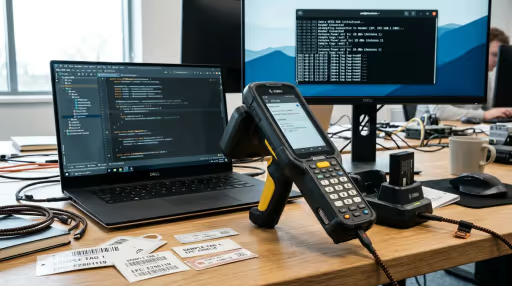
Supported Zebra RFID Handhelds & Sleds
The Zebra RFID API3 SDK v2.0.5.275 supports both integrated enterprise mobile terminals and modular wireless Bluetooth/eConnex sleds:
MC3300R / MC3390R
Premium all-in-one Android handheld terminal with integrated UHF reader. Internal high-speed serial bus transport with up to 900 tags/sec read rate.
Zebra RFD40 / RFD40+
Standard and premium UHF sled connecting to Zebra TC21/TC26 or third-party smartphones via eConnex 8-pin physical adaptor or Bluetooth 5.3 BLE.
Zebra RFD90 Ultra-Rugged
Heavy industrial IP65/IP67 UHF sled designed for manufacturing, yard management, and harsh distribution centers. 1300+ tags/sec long-range read.
Zebra RFD8500 Sled
Widely deployed Bluetooth Classic UHF RFID and 1D/2D barcode sled compatible with Android, iOS, and Windows tablets for retail inventory.
How to Integrate Zebra RFID API3 in Android Studio
Follow this guide to configure Gradle dependencies, declare Android 12+ Bluetooth permissions, and manage asynchronous tag reader callbacks.
Gradle Dependency Setup & Duplicate Class Prevention
Place rfidapi3lib-2.0.5.275.aar and rfidapi3ziotcllrplib-2.0.5.275.aar inside your app/libs/ directory. Crucially, exclude rfidapi3llrplib to prevent duplicate class symbol collisions:
dependencies {
    // Include all AARs in libs but exclude rfidapi3llrplib to avoid duplicate LLRPClient classes
    implementation fileTree(dir: 'libs', include: ['*.aar', '*.jar'], exclude: ['rfidapi3llrplib-*.aar'])

    // Required networking & async dependencies used by Zebra ZIOTC sled protocols
    implementation 'org.nanohttpd:nanohttpd:2.3.1'
    implementation 'org.java-websocket:Java-WebSocket:1.6.0'
}Android 12+ Bluetooth Runtime Permissions & Proguard Rules
Connecting to Zebra RFD40 or RFD8500 Bluetooth sleds on Android 12 through Android 14 requires modern Bluetooth permissions. Add these to your manifest and protect Zebra JNI interfaces from Proguard obfuscation:
<!-- Bluetooth permissions for RFD40 / RFD8500 sleds -->
<uses-permission android:name="android.permission.BLUETOOTH" />
<uses-permission android:name="android.permission.BLUETOOTH_ADMIN" />
<uses-permission android:name="android.permission.BLUETOOTH_SCAN" />
<uses-permission android:name="android.permission.BLUETOOTH_CONNECT" />
<uses-permission android:name="android.permission.ACCESS_FINE_LOCATION" /># Preserve Zebra RFID API3 classes and internal host services
-keep public class com.zebra.rfid.** { *; }
-keep public class com.zebra.rfidhost.** { *; }
-keep public class com.zebra.rfidserial.** { *; }
-dontwarn com.zebra.rfid.api3.**
-dontwarn android.os.ServiceManagerComplete Kotlin Implementation (Readers Init, Connection & Tag Stream)
Below is the complete, tested Kotlin integration service managing Zebra reader discovery, antenna RF power configuration, asynchronous tag callbacks, and clean teardown:
package com.rfidsoftwares.demo.zebra

import android.content.Context
import android.util.Log
import com.zebra.rfid.api3.*

class ZebraRfidService(private val context: Context) : RfidEventsListener {

    private var readers: Readers? = null
    private var availableRFIDReaderList: ArrayList<ReaderDevice>? = null
    private var readerDevice: ReaderDevice? = null
    private var rfidReader: RFIDReader? = null
    private var isConnected = false

    fun initialize() {
        Thread {
            try {
                // Discover all attached readers (Internal Serial + Bluetooth Sleds)
                readers = Readers(context, ENUM_TRANSPORT.ALL)
                availableRFIDReaderList = readers?.GetAvailableRFIDReaderList()

                if (!availableRFIDReaderList.isNullOrEmpty()) {
                    // Select first detected reader device
                    readerDevice = availableRFIDReaderList?.get(0)
                    rfidReader = readerDevice?.rfidReader

                    // Establish hardware session
                    rfidReader?.connect()
                    isConnected = true
                    Log.i("ZebraRFID", "Connected to Zebra reader: ${rfidReader?.hostName}")

                    configureReader()
                } else {
                    Log.w("ZebraRFID", "No Zebra RFID readers detected.")
                }
            } catch (e: Exception) {
                Log.e("ZebraRFID", "Hardware connection exception", e)
            }
        }.start()
    }

    private fun configureReader() {
        try {
            // Subscribe to inventory read events & pistol trigger events
            rfidReader?.Events?.addEventsListener(this)
            rfidReader?.Events?.setHandheldEvent(true)
            rfidReader?.Events?.setTagReadEvent(true)
            rfidReader?.Events?.setAttachTagDataWithReadEvent(true)

            // Configure RF Power to 270 (27.0 dBm) on Antenna 1
            val rfConfig = rfidReader?.Config?.Antennas?.getAntennaRfConfig(1)
            rfConfig?.transmitPowerIndex = 270
            rfidReader?.Config?.Antennas?.setAntennaRfConfig(1, rfConfig)
        } catch (e: Exception) {
            Log.e("ZebraRFID", "Error configuring antenna parameters", e)
        }
    }

    fun startInventory() {
        if (!isConnected || rfidReader == null) return
        try {
            rfidReader?.Actions?.Inventory?.perform()
            Log.i("ZebraRFID", "Zebra inventory sweep active.")
        } catch (e: Exception) {
            Log.e("ZebraRFID", "Failed to start inventory", e)
        }
    }

    fun stopInventory() {
        if (!isConnected || rfidReader == null) return
        try {
            rfidReader?.Actions?.Inventory?.stop()
            Log.i("ZebraRFID", "Zebra inventory sweep stopped.")
        } catch (e: Exception) {
            Log.e("ZebraRFID", "Failed to stop inventory", e)
        }
    }

    // Tag read notification callback from Zebra API3 engine
    override fun eventReadNotify(e: RfidReadEvents?) {
        val myTags = rfidReader?.Actions?.getReadTags(100)
        if (myTags != null) {
            for (tag in myTags) {
                val epc = tag.tagID
                val rssi = tag.peakRSSI
                Log.d("ZebraRFID", "Tag Scanned: EPC=$epc | PeakRSSI=$rssi dBm")
            }
        }
    }

    // Hardware status events (including pistol grip trigger clicks)
    override fun eventStatusNotify(statusEvents: RfidStatusEvents?) {
        if (statusEvents?.statusEventType == STATUS_EVENT_TYPE.HANDHELD_TRIGGER_EVENT) {
            val triggerData = statusEvents.handheldTriggerEventData
            if (triggerData.handheldEvent == HANDHELD_TRIGGER_EVENT_TYPE.HANDHELD_TRIGGER_PRESSED) {
                startInventory()
            } else if (triggerData.handheldEvent == HANDHELD_TRIGGER_EVENT_TYPE.HANDHELD_TRIGGER_RELEASED) {
                stopInventory()
            }
        }
    }

    fun disconnect() {
        try {
            if (isConnected) {
                rfidReader?.Events?.removeEventsListener(this)
                rfidReader?.disconnect()
                isConnected = false
            }
        } catch (e: Exception) {
            Log.e("ZebraRFID", "Error disconnecting reader", e)
        }
    }
}Top 5 Zebra Developer Pitfalls & Solutions
Field-tested solutions to the most frustrating build issues, runtime crashes, and Bluetooth drops in Zebra RFID development.
Duplicate class LLRPClient Error in Android Studio Gradle Build
Symptom: Build terminates with Duplicate class com.mot.rfid.api3.LLRPClient found in modules rfidapi3llrplib.aar and rfidapi3ziotcllrplib.aar.
Root Cause: rfidapi3ziotcllrplib.aar already includes all necessary LLRP client definitions for Bluetooth sleds. Importing both files into Gradle causes classloader collision.
GetAvailableRFIDReaderList() Returns Empty on Android 12+
Symptom: Sled is paired and connected in Android OS Bluetooth settings, but Zebra API3 detects 0 available readers.
Root Cause: Android 12 introduced granular Bluetooth permissions. If BLUETOOTH_CONNECT and BLUETOOTH_SCAN permissions are not approved by the user at runtime, the Zebra SDK cannot open Bluetooth sockets.
Pistol Trigger Presses Missed or Ignored by Application
Symptom: Physical trigger clicks on the MC3300R or RFD40 sled handle do not trigger scanning.
Root Cause: Handheld trigger events are turned off by default in the Zebra SDK to save serial bandwidth. You must explicitly activate rfidReader.Events.setHandheldEvent(true).
OperationFailureException: Reader is not connected on App Resume
Symptom: When unlocking the screen or returning to the app, calling Actions.Inventory.perform() crashes with OperationFailureException.
Root Cause: Zebra sleds disconnect their physical or Bluetooth link when the hosting Activity pauses to conserve sled battery.
Memory Exhaustion & JNI Buffer Overflow During 1,000+ Tag Scans
Symptom: Scanning high-density retail racks causes progressive slowdowns and eventually crashes the app process.
Root Cause: In high-throughput sweeps, failing to drain the native buffer via Actions.getReadTags(100) results in JNI memory exhaustion.
Zebra RFID API3 Libraries & Sample Code
Directly hosted with zero registration gating. Verify SHA-256 hashes against official Zebra release signatures.
| Asset File | Type | Size | SHA-256 Checksum | Action |
|---|---|---|---|---|
| rfidapi3lib-2.0.5.275.aar Core Zebra RFID API3 Android Archive | AAR | 1.7 MB | E01AB69906F0C7D22D9D... | Download |
| rfidapi3ziotcllrplib-2.0.5.275.aar Zebra ZIOTC LLRP Sled Client Library for RFD40/RFD8500 | AAR | 3.3 MB | 14C56934403855A79D19... | Download |
| zebra-rfid-api3-android-bundle.zip Complete AAR Bundle: Core library + ZIOTC sled driver | ZIP | 5.1 MB | 71F34962729175B3DBF1... | Download |
| zebra-rfid-sample-apps.zip Ready-to-import HHSampleApp & ZIOTCSampleApp projects + APK | ZIP | 11.5 MB | 48CB5589EFC70FA49363... | Download |
| ZebraRfidService.kt Runnable standalone Kotlin background service | Kotlin | 4.1 KB | Source Text | Download |
Zebra RFID API3 Frequently Asked Questions
Technical answers for Android developers, hardware integrators, and warehouse solution architects.
How do you fix Duplicate class LLRPClient errors between Zebra AAR files in Gradle?
Why does Readers.GetAvailableRFIDReaderList() return an empty list on Android 12+?
How do you listen for Zebra pistol grip trigger press and release events?
How do you prevent OperationFailureException: Reader not connected after sleep or backgrounding?
What is the difference between Zebra MC3300R integrated terminals and RFD40/RFD90 sleds?
Where can I download the complete Zebra HHSampleApp and ZIOTCSampleApp Android Studio projects?
Need an Enterprise Zebra RFID Application or ERP Integration?
Our engineering team builds custom Android APKs for Zebra MC3300R handhelds and RFD40/RFD90 sleds with sub-second SAP S/4HANA and Tally Prime inventory reconciliation.