
Chainway C72 UHF RFID Android SDK & Guide
Production engineering manual for integrating Chainway C72, C66, C70, and UR4 UHF readers into Android Studio. Includes hardware UART serial driver initialization, KeyCode 139 pistol trigger listeners, 64-bit ABI configuration, and 750 tags/sec debounce filtering.
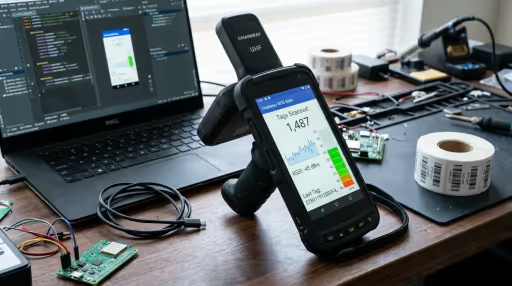
Supported Chainway Terminal Models
The cw-deviceapi20191022.jar driver has been verified on the following commercial Chainway devices across Android 6.0 through Android 13:
Chainway C72
Flagship Android rugged computer with integrated UHF pistol grip. Powered by Impinj Indy R2000 or Impinj E710 module. Read rate up to 750 tags/sec.
Chainway C66
Lightweight industrial 5.5-inch terminal with snap-on UHF pistol sled. Qualcomm octa-core processor with Android 9/11 support.
Chainway C70 / C71
Ultra-rugged compact Android handheld with internal circular antenna for healthcare, retail asset tagging, and field inspections.
Chainway UR4
4-port fixed industrial reader running Android OS. Used for conveyor tunnels, dock door portals, and production lines with GPIO light towers.
How to Integrate Chainway C72 in Android Studio
Follow this production setup pattern to avoid 64-bit ABI crashes, thread locks, and missing pistol trigger events.
Project Setup: build.gradle.kts & ABI Filtering
Copy cw-deviceapi20191022.jar into your app's libs/ folder. Because the driver contains 32-bit ARM binaries, configure abiFilters to avoid JNI loader crashes on modern Android devices:
android {
    defaultConfig {
        // Essential: Forces 32-bit ARM runtime to match Chainway JNI drivers
        ndk {
            abiFilters.addAll(listOf("armeabi-v7a"))
        }
    }

    dependencies {
        // Link all JAR files in the libs directory
        implementation(fileTree(mapOf("dir" to "libs", "include" to listOf("*.jar"))))

        // Recommended: Kotlin Coroutines for asynchronous tag dispatching
        implementation("org.jetbrains.kotlinx:kotlinx-coroutines-android:1.8.0")
    }
}Hardware Permissions & Proguard R8 Rules
Chainway readers communicate through internal serial bus ports and require hardware wake locks during continuous sweeps. Add the following to your manifest and Proguard configuration:
<!-- Internal serial & hardware wake permissions -->
<uses-permission android:name="android.permission.WAKE_LOCK" />
<uses-permission android:name="android.permission.VIBRATE" />
<uses-permission android:name="android.permission.RECEIVE_BOOT_COMPLETED" />

<!-- Required if writing tag logs to external storage -->
<uses-permission android:name="android.permission.READ_EXTERNAL_STORAGE" />
<uses-permission android:name="android.permission.WRITE_EXTERNAL_STORAGE" /># Preserve Chainway Device API and JNI bridges from obfuscation
-keep class com.rscja.deviceapi.** { *; }
-keep interface com.rscja.deviceapi.** { *; }
-keep class com.rscja.deviceapi.entity.** { *; }
# Prevent native method stripping
-keepclasseswithmembernames class * {
native <methods>;
}Complete Kotlin Implementation (UART Init, Trigger & Tag Loop)
Below is the complete, tested Kotlin implementation handling asynchronous hardware initialization, KeyCode 139 pistol trigger squeeze, continuous inventory buffer polling, and clean free() teardown:
package com.rfidsoftwares.demo.chainway

import android.os.Bundle
import android.os.Handler
import android.os.Looper
import android.util.Log
import android.view.KeyEvent
import androidx.appcompat.app.AppCompatActivity
import com.rscja.deviceapi.RFIDWithUHFUART
import com.rscja.deviceapi.entity.UHFTAGInfo

class ChainwayInventoryActivity : AppCompatActivity() {

    private var mReader: RFIDWithUHFUART? = null
    private var isInventoryRunning = false
    private val mainHandler = Handler(Looper.getMainLooper())

    override fun onCreate(savedInstanceState: Bundle?) {
        super.onCreate(savedInstanceState)
        initHardwareReader()
    }

    private fun initHardwareReader() {
        // ALWAYS initialize hardware on a worker thread to prevent UI freezing
        Thread {
            try {
                mReader = RFIDWithUHFUART.getInstance()
                val success = mReader?.init() ?: false
                if (success) {
                    Log.i("Chainway", "UHF Reader powered on successfully.")
                    // Set RF transmission power (5 to 30 dBm; 30 = Max distance)
                    mReader?.setPower(30)
                    // Set Indian WPC Frequency Hopping (865 - 867 MHz)
                    mReader?.setFrequencyMode(3)
                } else {
                    Log.e("Chainway", "Failed to power on UART serial port /dev/ttyMT2")
                }
            } catch (e: Exception) {
                Log.e("Chainway", "Hardware init exception", e)
            }
        }.start()
    }

    fun startInventory() {
        if (isInventoryRunning || mReader == null) return
        val started = mReader?.startInventoryTag() ?: false
        if (started) {
            isInventoryRunning = true
            startReadThread()
        }
    }

    fun stopInventory() {
        if (!isInventoryRunning) return
        mReader?.stopInventory()
        isInventoryRunning = false
    }

    private fun startReadThread() {
        Thread {
            while (isInventoryRunning && mReader != null) {
                // Read from internal hardware circular buffer
                val tagInfo: UHFTAGInfo? = mReader?.readTagFromBuffer()
                if (tagInfo != null) {
                    val epc = tagInfo.epc
                    val rssi = tagInfo.rssi
                    mainHandler.post {
                        onTagScanned(epc, rssi)
                    }
                } else {
                    Thread.sleep(10) // Yield CPU to avoid thread starvation
                }
            }
        }.start()
    }

    private fun onTagScanned(epc: String, rssi: String?) {
        Log.d("Chainway", "Tag Read: EPC=$epc | RSSI=$rssi dBm")
        // Route to SQLite outbox, ViewModel StateFlow, or ERP sync
    }

    // Intercept physical pistol grip trigger keycode
    override fun onKeyDown(keyCode: Int, event: KeyEvent?): Boolean {
        if (keyCode == 139 || keyCode == KeyEvent.KEYCODE_F4) {
            if (event?.repeatCount == 0 && !isInventoryRunning) {
                startInventory()
                return true
            }
        }
        return super.onKeyDown(keyCode, event)
    }

    override fun onKeyUp(keyCode: Int, event: KeyEvent?): Boolean {
        if (keyCode == 139 || keyCode == KeyEvent.KEYCODE_F4) {
            stopInventory()
            return true
        }
        return super.onKeyUp(keyCode, event)
    }

    override fun onDestroy() {
        super.onDestroy()
        stopInventory()
        // CRUCIAL: Release UART serial port and cut RF module battery power
        mReader?.free()
        mReader = null
    }
}Top 5 Chainway Developer Pitfalls & Solutions
Solutions to the most common bugs, crashes, and hardware conflicts encountered when building Android RFID applications for the Chainway C72.
mReader.init() returns false / UART Serial Port Locked
Symptom: RFIDWithUHFUART.getInstance().init() returns false, or logs "open port error: /dev/ttyMT2".
Root Cause: The factory pre-installed KeyboardEmulator utility or 2D Barcode scanner service runs in the background and holds an active lock on the internal serial bus. Alternatively, the previous Activity was destroyed without calling mReader.free().
java.lang.UnsatisfiedLinkError on 64-bit Android OS
Symptom: App crashes upon startup with dlopen failed: library "librscja_deviceapi.so" not found.
Root Cause: Chainway's native JNI shared libraries inside cw-deviceapi.jar are 32-bit (armeabi-v7a). If your app includes 64-bit dependencies (such as modern Firebase or SQLite), Android attempts to load the app in 64-bit mode and fails to find the 64-bit Chainway driver.
Physical Pistol Grip Trigger Squeeze Does Not Fire Scans
Symptom: Squeezing the physical handle trigger does nothing, while clicking an on-screen "Scan" button works properly.
Root Cause: The pistol trigger is mapped to proprietary keycodes 139 or KEYCODE_F4 (134) rather than standard Android gamepad or camera keys.
UI Freezes and ANRs During Pallet Sweeps (500+ Tags)
Symptom: When scanning pallets containing 500+ tags, the app UI stutters, stops responding to touch, and Android triggers an Application Not Responding (ANR) dialog.
Root Cause: Posting every tag individually via runOnUiThread overwhelms the Android Choreographer queue.
Rapid Battery Drain & Hardware Heating When Idle
Symptom: The handheld device gets noticeably hot and depletes its 8,000 mAh battery within 2 to 3 hours even when the app is sitting in the background.
Root Cause: The UHF RF power amplifier consumes up to 1000mW when energized. If stopInventory() and free() are omitted when the activity is paused or backgrounded, the antenna continues active RF carrier emission.
Verified Binary Downloads & SHA-256 Checksums
All files are hosted directly on our fast CDN infrastructure. Verify file integrity using standard SHA-256 tools.
| Asset File | Format | Size | SHA-256 Checksum | Action |
|---|---|---|---|---|
| cw-deviceapi20191022.jar Official UART driver library for Chainway C72/C66 | JAR | 499 KB | D3469E15AFCEA11DF9C2... | Download |
| chainway-c72-uhf-sdk-bundle.zip Complete package: Driver JAR, Kotlin demo, and Proguard configs | ZIP | 468 KB | F9D8E4A63E80E251D633... | Download |
| ChainwayInventoryActivity.kt Standalone runnable Kotlin Activity source | Kotlin | 4.2 KB | Source Text | Download |
| UhfReaderManager.kt Multi-Vendor HAL: Reflection driver for Chainway, Zebra & Seuic | Kotlin | 48 KB | Source Text | Download |
Chainway C72 SDK Frequently Asked Questions
Technical answers for Android engineers, device architects, and enterprise system integrators.
Why does RFIDWithUHFUART.getInstance().init() return false on Chainway C72?
How do you fix java.lang.UnsatisfiedLinkError on 64-bit Android devices?
Which KeyCode is triggered by the Chainway C72 pistol grip button?
How do you prevent the Android UI from freezing during 750 tags/second sweeps?
How do you configure the Chainway C72 for Indian WPC 865–867 MHz frequencies?
Can Chainway C72 connect directly to Tally Prime and SAP S/4HANA over Wi-Fi?
Need a Turnkey Chainway C72 Mobile Application?
Our engineering team builds custom Android APKs for Chainway handhelds, featuring offline SQLite syncing, acoustic tag locator Geiger counters, and instant integration with Tally Prime and SAP S/4HANA.